How to use the archive
The STELLA@AIP archive hosts the STELLA Data release 1 and also the VPNEP data release.
Download files
The VPNEP data release and STELLA DR1 can both be downloaded here: Files
Query interface
In the navigation bar, you can find the Query interface button. This is how to use it to access the tables:
- Insert your SQL query in the text area SQL query or choose an example query from the Examples tab in the top-right of the interface (just double click on one of them) above the text area.
- Choose either ADQL or PostgreSQL. Choose one of the Queues
- Click Submit new SQL Query button to submit your job.
- After a successful job submission, your job will appear in the Job list bar on the left. Its name corresponds to the result-table name, which is either the current time stamp or a name that you have provided in the Table name field.
- You can view your results by clicking on the table name for your job in the Job list and then choosing the Results table tab. The results can be downloaded via the Download tab. Download provides various formats. Currently, CSV, FITS and IVOA VOTable XML files are available. The Plot tab provides a very simple plot-interface for numeric columns.
The Query interface allows to upload your own VOTables into your private user database at STELLA@AIP. The uploaded tables can be queried like any other database using SELECT statements. You can also browse the available tables and their columns using the “Database Browser” below the Query Form or referring to UPLOAD_TABLES.<table_name> where <table_name> is the name of the table to provided during upload.
Cone search
The cone search allows you to search for all objects in the database that reside in a predefined cone on the sky.
The cone is defined by its center point in equatorial coordinates (right ascension ra and declination dec) and a radius.
The Cone search API follows the VO specification.
You can enter the coordinates of the center point and the search radius in degrees into the Cone search form in the Query interface. After submitting the cone search, the input is translated into a PostgreSQL query and then, run as a normal query job. Since it is a regular query job, the results are stored as a table in the user database and can be downloaded as VOTable, FITS or CSV file.
For the calculations on a sphere, we use the PostgreSQL extension pgSphere.
Generally, the query for the Cone search is of the form:
SELECT objname, ra, dec
FROM stella_vpnep.objects
WHERE spoint(RADIANS(ra), RADIANS(dec)) @ scircle(spoint(RADIANS(270.0),RADIANS(70.0)), RADIANS(1.0))
You can use the Cone search API for scripted access using your favorite HTTP command line client, e.g.:
wget 'https://stella.aip.de/conesearch/api/objects/?RA=270.0&DEC=70.0&SR=1&VERB=1'

curl 'https://stella.aip.de/conesearch/api/objects/?RA=270.0&DEC=70.0&SR=1&VERB=1'

http 'https://stella.aip.de/conesearch/api/objects/?RA=270.0&DEC=70.0&SR=1&VERB=1'
Scripted access
STELLA@AIP supports IVOA TAP (Table Access Protocol) and thus, the data can be accessed using scripts (Scripted access via TAP).
TOPCAT
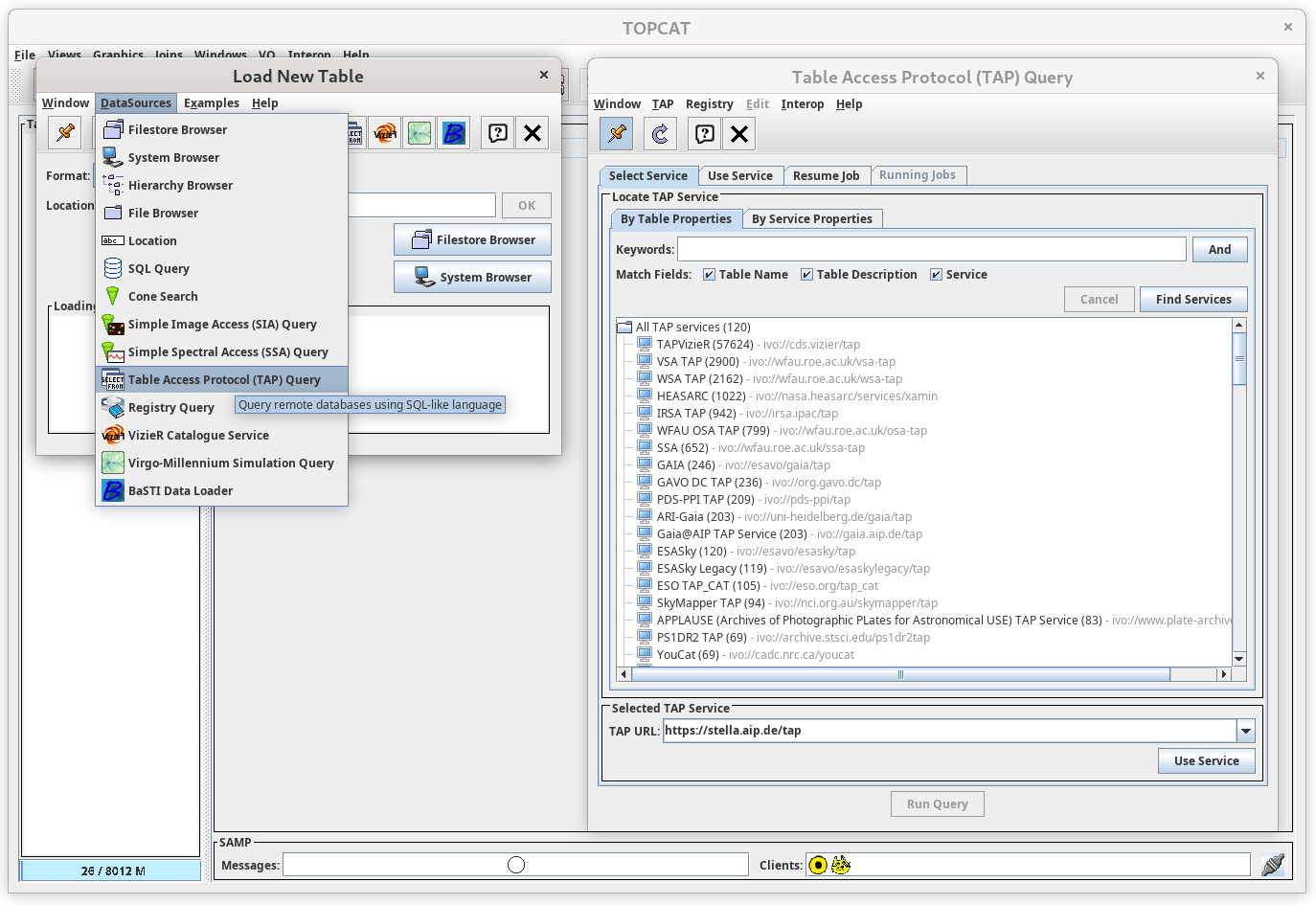
TOPCAT can access the data via TAP using the following TAP url
https://stella.aip.de/tap